Window Configuration
You have a number of options to configure the main EVMax window to match how you prefer to enter or view the data. You may want to try different options to determine which ones fit your working style or what you want to accomplish. You can use the various Ribbon Menu options to change your view or save a custom view. You also have other options with the row and column grid views in this window.
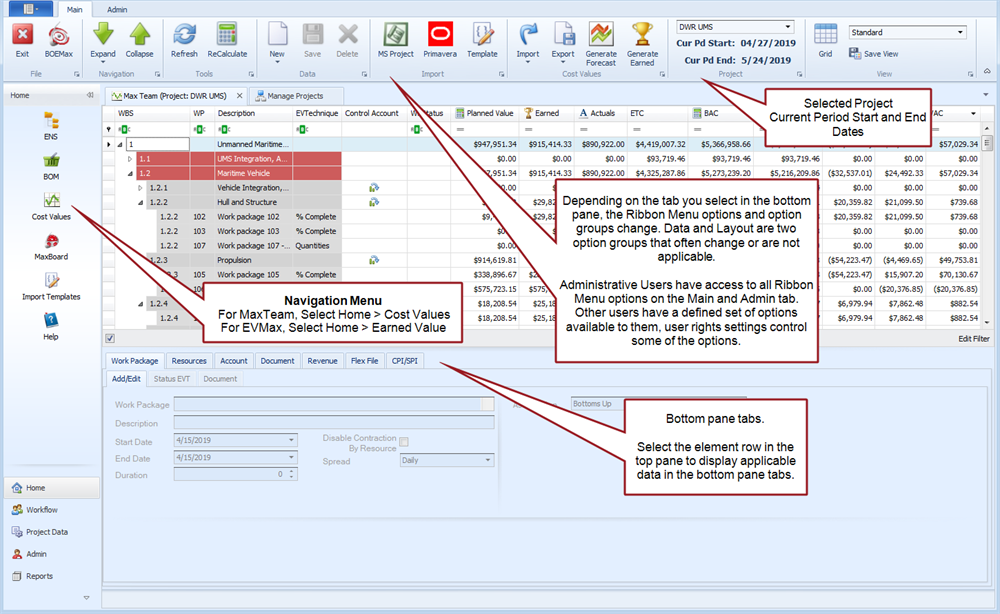
The default main tab standard view is illustrated below. The top pane displays a row and column grid with the work breakdown structure (WBS) hierarchy and a default set of columns. Depending on the row and column, you can enter or update data directly in a grid cell. Otherwise, select a row in the top pane and use the bottom pane tabs to enter or view the data. The bottom pane includes the Work Package, Resources, Account, Document, Revenue, Flexfile, and CPI/SPI tabs. User defined fields are included in the top pane as grid columns or bottom tabs as applicable.
 Expand and Collapse
There are two ways you can expand or collapse the WBS hierarchy. You can:
- Click or in the Ribbon Menu.
- Select a row and click the right arrow to expand the hierarchy, or click the down arrow to collapse the hierarchy.
Heading Row Options
For row and column views, you can use the heading row to hide or show columns, change the order of the columns, or apply filters. Once you have created a custom view, you can save it for future use.
Column and Filter Controls
- Click on a column heading and drag it to the position you want or drag it above the heading row to hide it.
- Right click in a column heading to display a list of options:
- Sort Ascending
- Sort Descending
- Column Chooser. Column Chooser displays a dialog box of available fields that can be included as a column in the view. Select the field then drag and drop it in the heading row.
- Best Fit
- Best Fit (All Columns)
- Clear Filter. This option is only available when a filter has been applied. Any filter settings display in the lower left corner of the row and column view.
- Filter Editor... Use this option to set a filter. The Filter Editor includes prompts to help you build a filter. Once you have set your filter criteria, click Apply. You can also apply filters to columns in the various tabs such as Pivot, Work Package, and Resource. Right click in the field heading to apply a filter.
- Show Find Panel. Click to show or hide a search bar at the top of the row and column view.
- Hide Auto Filter Row. Click to hide or show the filter cells below the heading row.
Cost Groups in Totals
You can control which project level cost report group is used for the total value columns in the main EVMax window. To set the total cost report groups:
- Select the Admin tab.
- Click in the Ribbon Menu. A Cost Groups in Totals dialog box displays.
- Select the budget cost report group from the dropdown.
- Select the actual cost report group from the dropdown.
- Selected the earned value cost report group from the dropdown.
- Select the estimate to complete cost report group from the dropdown.
- Click .
For more information about project level settings including adding cost codes and cost report groups, see Project Setup Options.
Custom Totals
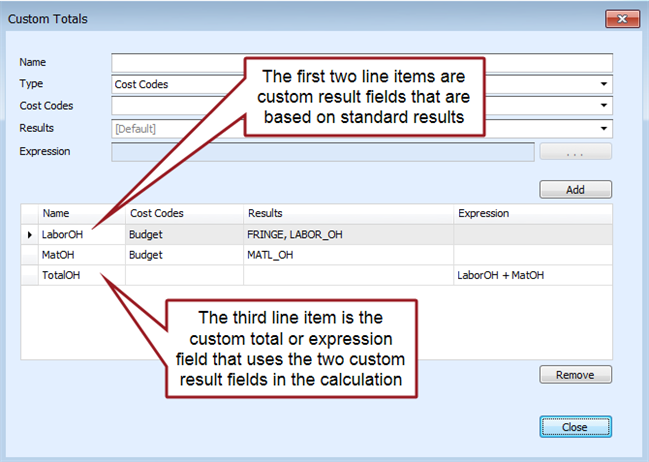
You can add custom total value fields as a user defined column in the main EVMax window. See Define Custom Total Fields.
Once you create these fields, you can hide or show them in the main EVMax window. You can also include the custom total fields in report outputs. You must be an administrative user to create custom total fields.
The Custom Totals dialog box is shown below with example custom fields.
Results in Totals
You can control which results are included in the total value columns in the main EVMax window. To set the results you want to include:
- Select the Admin tab.
- Click in the Ribbon Menu. A Results in Totals dialog box displays.
- For each result row, either check or uncheck the box in the Include column.
- Click .
Saving a View
Once you have created a custom column layout with or without filters applied, do the following:
- Click in the Ribbon Menu. A Save View dialog box displays.
- Enter a for your custom view.
- The check box is checked by default. If you want your custom view to be available to other users, leave it checked. Otherwise, click on the box to uncheck it.
- Click .
The next time you open the main EVMax window, you can select your custom view from the dropdown in the Ribbon Menu.
Layout Ribbon Menu Options
The Layout category of Ribbon Menu options may or may not appear depending on the tabs you select within the main EVMax window. The standard view of the window includes the series of tabs in the lower pane. This includes the Work Package, Resources, Account, Document, Revenue, Flexfile, and CPI/SPI tabs. Tab specific options are noted below.
Work Package Tab, Document Tab
- Click to make it easier to enter documentation text. Click it again to return to the standard view.
Document Tab
- Click to make it easier to enter documentation text. Click it again to return to the standard view.
Grid View Ribbon Option
The default standard view is organized into top and bottom panes. The top pane is the standard row and column grid with the WBS hierarchy and the default set of columns. You select a row in the top pane and use the bottom pane tabs to enter or view the data. The bottom pane includes the Work Package, Resources, Account, Document, Revenue, Flexfile, and CPI/SPI tabs.
Clicking the View option in the Ribbon Menu changes the layout of the two panes. You now have a left pane with a limited set of WBS hierarchy columns. The right pane includes the Work Package, Resources, Account, Document, Revenue, Flexfile, and CPI/SPI tabs. Notice you also have a Grid tab that shows the budget time phased details for the WBS element selected in the left pane. You may find this Grid tab useful for manually entering or updating the budget time phased labor resource FTE/hour values. You can only enter base result values in the Grid tab.
Also notice the Grid View Properties tab on the right. Click on the tab to display the Properties dialog box. As desired, select the Cost Code and Result you want to show in the grid. You can also sort the columns and apply a filter. Click Apply to save your settings and return to the grid view. If you have checked the Allow Qty Time Phasing check box in the Manage Projects tab window, Setting tab, you can also select the bill of material (BOM) quantity in the Properties dialog box.
Click the View option in the Ribbon Menu to return to the default standard view.
Style Settings
You can modify the default WBS hierarchy level colors and font style used in the main window row and column view. To do this:
- Select the Admin tab.
- Click in the Ribbon Menu. A Style Settings window displays.
- Click in the , , or cells to select from a dropdown list of options.
- Optional. Add or delete levels as desired.
- Click .
Keyboard Shortcuts
Useful keyboard shortcuts when you are adding, updating, or deleting work packages and resources include:
- New: Ctrl + N
- Save: Ctrl + S
- Delete: Ctrl + Delete